
Nested Loops in C++
When you are discovering how to learn C++ step by step, you eventually reach a point where a single loop isn’t enough to handle complex data. This is where Nested Loops come in. If you have ever seen a program print a grid, a triangle of stars, or handled a complex table, you have seen nested loops in action.
Definitions
Before we dive into the mechanics, let’s define our terms simply:
| Term | Description |
|---|---|
| Nested Loop | A loop placed inside the body of another loop. |
| Outer Loop | The “parent” loop that controls how many times the entire inner process repeats. |
| Inner Loop | The “child” loop that must finish all its repetitions before the outer loop can move to its next step. |
| Iteration | One complete “lap” or cycle of a loop. |
| Pattern Printing | Using loops to display shapes (like rectangles or triangles) on the screen. |
The Mechanics: How Nested Loops Work
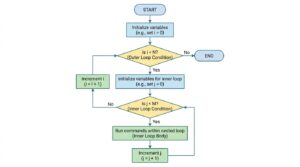
The most important thing to remember is the priority of execution.
- The Outer Loop starts its first iteration.
- The program enters the Inner Loop, which runs from start to finish until its condition becomes false.
- Only after the inner loop is completely finished does the program go back to the top of the outer loop to start the second iteration.
- This cycle repeats until the outer loop’s condition finally becomes false.
Relatable Daily Life Example: The Wall Clock
Think of a clock as a nested loop:
- Outer Loop: The Hours hand. It only moves one “step” after the minutes have finished a full cycle.
- Inner Loop: The Minutes hand. It must go through all 60 steps (0 to 59) before the Hour hand can increment by one.
Comparing the “Big Three” Loops & Control Flow
As we have discussed in previous lessons, C++ offers different repetition structures. Here is how they fit into the concept of nesting:
Entry-Controlled vs. Exit-Controlled
- Entry-Controlled (For, While): These check the condition before entering the loop. If the condition is false at the start, the loop (and any nested loops inside it) will never run.
- Exit-Controlled (Do-While): This checks the condition after the body runs. In a nested scenario, a do-while loop would guarantee that the inner code runs at least once before checking if it should repeat.
When to Choose Which?
- For Loop: Best for nested patterns where you know exactly how many rows and columns you need.
- While Loop: Best when the nesting depends on a condition that might change dynamically.
- Do-While: Best for menus where you want to show options at least once before checking if the user wants to continue.
The Break Statement in Nested Loops
A common point of confusion is using break inside nested loops. If you place a break inside the inner loop, it will only exit that specific inner loop; it does not stop the outer loop. The outer loop will continue to its next iteration as if nothing happened.
Practical Code Example: User-Defined Triangle Pattern
This code allows a user to define the “limit” of the pattern, making the program dynamic.
#include <iostream>
using namespace std;
int main() {
    int rows;
    cout << "Enter the number of rows: ";
    cin >> rows;
    // Outer Loop: Controls the number of lines (Rows)
    for (int i = 1; i <= rows; i++) {
        // Inner Loop: Controls how many stars in each line
        for (int j = 1; j <= rows; j++) {
            cout << "*  ";
            // Logic to turn a square into a triangle
            if (j >= i) {
                break; // Exit ONLY the inner loop
            }
        }
        // Move to the next line after the inner loop finishes
        cout << endl;
    }
    return 0;
}
Input: 5
Output:
*
*  *
*  *  *
*  *  *  *
*  *  *  *  *
Interactive Elements: Try It Yourself!
- Reflection Prompt: Why are nested loops essential for working with a 2D grid (like a chessboard)?
- Challenge 1: Modify the code above to print the triangle upside down (starting with 5 stars and ending with 1).
- Challenge 2: Write a nested loop that prints a 10×10 multiplication table. (Hint: Inner loop handles the columns, outer loop handles the rows).
- Logic Test: If you have an outer loop running 3 times and an inner loop running 4 times, how many times total will the code inside the inner loop execute?
- Predict the Output: What happens if you forget the cout << endl; statement between the inner and outer loop?
- Write a program to print the following patterns:-
 * * * * *   //get the number of rows from user
   * * * *
     * * *
       * *
         *
1       // get the number of rows from user
2  2
3  3  3
1
2 3
4 5 6
1
1 2 1
1 2 3 2 1
    1
  1 2 1
1 2 3 2 1
  1 2 1
    1
Engagement Boost: Let’s Talk!
- What’s your biggest C++ fear? Is it nesting logic or understanding how the break statement jumps between loops?
- Share your results: Did you manage to create a diamond shape using nested loops? Tell us in the comments!
Take the Next Step
For deeper technical documentation, check out the C++ Reference on Nested Control Flow.
Happy Coding!