
do while loop in C++
In this journey, you eventually discover that some tasks need to happen at least once before you check if they should happen again. While the for and while loops are great for many scenarios, C++ provides a specialized tool for this specific need: the Do-While Loop.
In these notes, we will break down how this loop works, why it is different from its cousins, and how to use it like a pro.
Definitions
Before diving into the logic, let’s define our terms simply:
- Do-While Loop: A repetition structure that executes a block of code first and then checks a condition to see if it should repeat.
- Post-test Loop: Another name for the do-while loop because the “test” (the condition) happens after the body runs.
- Exit-controlled Loop: A loop where the “control” (the decision to stop or continue) happens at the exit point.
- Entry-controlled Loop: A loop (like for or while) where the condition is checked before you are allowed to enter the loop body.
- Loop Body: The set of instructions inside the curly braces that the program repeats.
- Semicolon (;): In a do-while loop, a semicolon is required after the while condition—a common mistake for beginners!
The Logic: Why do-while Loop is Unique
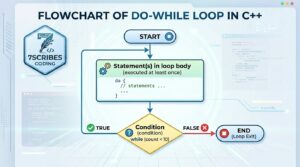
The most critical feature of a do-while loop is that it is guaranteed to execute at least once.
In a standard while loop, if the condition is false at the very beginning, the code inside never runs. However, in a do-while loop, the program enters the do block immediately, runs the code, and only then looks at the while condition at the bottom. If the condition is true, it jumps back to the top; if false, it exits.
Relatable Daily Life Examples
- Eating Biscuits: You pick up a biscuit and eat it first. After eating, you check your stomach: “Am I still hungry?”. If yes, you repeat the action and eat another; if no, you stop. You always eat at least one biscuit before checking.
- The ATM Machine: When you go to an ATM, the machine allows you to insert your card and enter your PIN first. It only checks if the PIN is correct after you have provided it.
- Online Shopping: Many websites allow you to browse products and add them to a cart first. The “condition” (asking you to register or log in) often only happens when you are ready to check out.
The Syntax: How to Write It
The structure of the do-while loop is slightly different because it starts with the do keyword:
// 1. Initial Statement (Variable initialization)
int i = 1;
do {
    // 2. Body: Actions to perform
    cout << "Value: " << i << endl;
       // 3. Update: Change the variable
    i++;
} while (i <= 5); // 4. Condition: Note the semicolon at the end!
Comparing the “Big Three”: For, While, and Do-While
Though all three loops have the same “power” and can often perform the same tasks, they are best used in different scenarios:
| Loop Type | Category | Best Used When… |
| For Loop | Entry-controlled | You know exactly how many times the loop should run. |
| While Loop | Entry-controlled | You don’t know the number of iterations and want to check the condition before doing anything. |
| Do-While Loop | Exit-controlled | You want the code to execute at least once, regardless of the condition. |
Entry-Controlled vs. Exit-Controlled
- Entry-Controlled (for, while): Think of this like a movie theater where a guard checks your ticket before you enter the hall. No ticket? No movie.
- Exit-Controlled (do-while): Think of this like a restaurant where you eat your meal first and the “check” (the condition) comes at the end before you leave.
Practical Code Examples:
Example 1: The Cookie Counter
Based on the video example, here is how you might track eating cookies from a jar of five.
#include <iostream>
using namespace std;
int main() {
    int totalCookies = 5;
    int eaten = 0;
    do {
        // You eat the cookie first
        eaten++;
        cout << "Eating cookie number: " << eaten << endl;
        // One less cookie in the jar
        totalCookies--;
        // Now check if there are cookies left
    } while (totalCookies > 0);
    cout << "The jar is empty!" << endl;
    return 0;
}
Interactive Elements: Try It Yourself!
- Reflection Prompt: Why do you think a do-while loop is the best choice for a “Menu” program (e.g., “Press 1 to Start, 2 to Exit”)?
- Challenge 1: Write a do-while loop that asks the user to enter a password and keeps asking until they enter “1234”.
- Challenge 2: Predict the output: If you set int x = 10; and use a do-while loop with the condition while (x < 5);, how many times will the loop run? (Hint: Remember it’s exit-controlled!).
- Challenge 3: Rewrite the “Cookie Counter” above using a while loop. How does the logic change if the jar is already empty when you start?
- Logic Test: What happens if you forget the i++ (update statement) inside your do-while loop?
Engagement Boost: Let’s Chat!
- What is your biggest C++ fear? Is it loops, or something else entirely?
- Question for the comments: Can you think of another real-life “exit-controlled” scenario? Share it below!
Ready to Master C++?
To see these loops in action with live coding and flow diagrams, make sure to:
- Watch the full video: C++ Do-While Loop Explained for a visual walkthrough.
- Practice: Download these notes and try the challenges in your own compiler!
- Subscribe: Stay updated as we continue our C++ journey together.
For official technical documentation, visit the ISO C++ Reference on Iteration Statements.
Happy Coding!