
for Loop in C++
When you are learning how to learn C++ step by step, you eventually reach a point where you need to repeat a task a specific number of times—like printing the numbers 1 to 100 or processing a fixed list of items. While we previously explored the while loop, the For Loop is a specialized, cleaner version designed specifically for these “counter-controlled” tasks.
Definitions
Let’s define our terms before diving into the logic:
| Term | Definition |
|---|---|
| For Loop | A repetition structure used to run a block of code a fixed number of times. |
| Counter/Count-Controlled Loop | A loop that relies on a counter to determine when to start and stop. |
| Iterator | The variable used to “count” each pass through the loop (often named i). |
| Initialization | The starting point where you give your counter its first value. |
| Condition | The test that decides if the loop should continue or stop. |
| Update | The step that changes the counter after every loop (e.g., adding or subtracting 1). |
| Loop Body | The actual instructions that get repeated. |
| Scope | The “territory” where a variable is recognized by the program. |
Pre-increment (++i) |
Increases the value before it is used in the current expression. |
Post-increment (i++) |
Increases the value after it has been used in the current expression. |
The Syntax: How to Write a For Loop
The for loop combines three important pieces into one single line, making it very organized.
The General Format:
for (initialization; condition; update) {
// Code to repeat (Body)
}
- Initialization: Runs only once at the very beginning.
- Condition: Checked before every single loop. If it’s true, the body runs; if false, the loop exits.
- Update: Runs after the body code is finished to change the counter.
Relatable Daily Life Example: The Chocolate Robot
Imagine you have four empty boxes and a robot helper. You want the robot to put one chocolate in each box.
- Start (Initialization): You tell the robot, “Start with Box #1”.
- Check (Condition): The robot asks, “Is the current box number less than or equal to 4?”.
- Action (Body): The robot puts a chocolate in the box.
- Next Step (Update): The robot moves to the next box (Box #2).
- Finish (Termination): Once the robot reaches “Box #5,” the condition becomes false because you only have four boxes. The robot stops and exits.
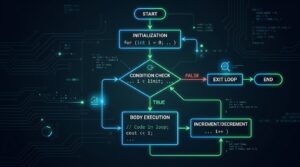
Execution Flow: What Happens Inside?
A common mistake for students with some basic coding background is misunderstanding the order of operations. Here is the exact path C++ takes:
- Initialize the variable (e.g., int i = 1).
- Check the Condition (e.g., i <= 4).
- If true, execute the Body (the statements inside { }).
- Run the Update (e.g., i++).
- Go back to Step 2 (Check the condition again).
Examples
Example 1: Basic Number Counting (Beginner)
#include <iostream>
using namespace std;
int main() {
    // Initialization: i starts at 1
    // Condition: Run while i is less than or equal to 5
    // Update: Increase i by 1 after each loop
    for (int i = 1; i <= 5; i++) {
        cout << "Count: " << i << endl;
    }
    return 0;
}
Example 2: Iterating Through Characters (Beginner-Intermediate)
#include <iostream>
using namespace std;
int main() {
    // Iterating from 'a' to 'e'
    for (char ch = 'a'; ch <= 'e'; ch++) {
        cout << "Letter: " << ch << endl;
    }
    return 0;
}
ch++ increments the ASCII value of the character, moving it to the next letter in the sequenceASCII Range for Letters
| Category | Start (Dec) | End (Dec) | Start (Hex) | End (Hex) |
|---|---|---|---|---|
| Uppercase | 65 (A) | 90 (Z) | 0x41 | 0x5A |
| Lowercase | 97 (a) | 122 (z) | 0x61 | 0x7A |
Example 3: Custom Increments (Skipping)
i++. You can increase the counter by any amount, such as by 2 to find even numbers.for (int i = 0; i <= 10; i += 2) {
std::cout << i << " ";
}// Output: 0 2 4 6 8 10
for Loop vs while Loop
1. Choose a For Loop for Fixed Limits
- Counter-Controlled: Because it is designed to run for a set duration (like 1 to 10 or 1 to 100), it is often called a counter loop or count-controlled loop.
- Known Endpoints: If you have a clear starting and ending point—such as printing the alphabet from A to Z—the for loop is the ideal choice.
- Cleaner Syntax: The for loop is often preferred by programmers because it is more organized; it combines the initialization, condition, and update (increment/decrement) into a single line of code.
2. Choose a While Loop for Unknown Limits
- Condition-Based: It functions as a general “condition loop,” meaning it will keep running as long as a certain state remains true, regardless of how many cycles that takes.
- Dynamic Scenarios: It is better suited for situations where the loop’s termination depends on user input or a change in data that doesn’t happen at a fixed interval.
Summary Comparison
|
Feature
|
For Loop
|
While Loop
|
|---|---|---|
|
Best Used When…
|
The number of iterations is fixed and known.
|
The number of iterations is unknown.
|
|
Common Name
|
Counter-controlled loop.
|
Condition-controlled loop.
|
|
Structure
|
Initialization, condition, and update are all in one line.
|
Initialization and update are typically handled separately from the condition.
|
|
Example
|
Processing exactly 4 boxes of chocolates.
|
Repeating a task until the user chooses to quit.
|
Pro Tips and Common Pitfalls
-
The Semicolon Trap
Never put a semicolon directly after the for(…) header. If you write for(int i=1; i<=10; i++);, the loop will terminate immediately and do nothing.
-
Variable Scope
If you declare your variable inside the loop (for (int i = 0…)), you cannot use i outside of those brackets. To use the counter after the loop is done, you must declare it before the loop starts.
-
Increment vs. Decrement
- Increment (i++): Adds 1 to the value. Great for counting up from A to Z.
- Decrement (i–): Subtracts 1. Perfect for countdowns (e.g., counting from Z down to A).
- Custom Updates: You aren’t limited to 1! You can jump by 5s or 10s using i += 5 or anything.
Interactive Elements: Try It Yourself!
- Table Challenge: Try building a simple multiplication table using what you’ve learned.
- Alphabet Challenge: Try to write a loop that prints the lowercase letters ‘a’ through ‘z’ using a single char variable.
- Reflection Prompt: Why do you think the for loop is called “entry-controlled”? (Hint: Think about when the condition is checked).
- Coding Challenge 1: Write a program that prints all even numbers from 2 to 20.
- Coding Challenge 2: Create a countdown from 10 to 1 that prints “Blast off!” at the end.
- Logic Challenge: If you write for (int i = 1; i <= 5; i–), what will happen?
Take the Next Step
Ready to see the code in action?
For official technical details, you can explore the C++ Reference for Iteration Statements.
Happy Coding!