
While Loop in C++
When you are learning how to write a program in C++ step by step, you eventually encounter tasks that need to be done multiple times—like calculating marks for an entire class of students. Instead of writing the same code over and over, we use repetition structures.
In this guide, we dive deep into the While Loop, the go-to tool for when you don’t know exactly how many times you need to repeat a task,.
Definitions
Before we explore the logic, let’s define the key concepts simply:
| Term | Definition |
| Repetition Structure | A programming tool designed to repeat a specific set of instructions multiple times without rewriting the code. |
| While Loop | A “condition-based” loop that continues to execute its statements as long as a specified condition remains true. |
| Loop Condition | A logical expression (resulting in true or false) that determines whether the loop should continue or stop. |
| Loop Body | The specific block of code located inside the loop that is executed during each iteration. |
| Pre-test Loop | A loop that evaluates the condition before executing the body. If the condition is false at the start, the body is never executed. |
| Initialization | The process of setting a starting value for the variable that the loop condition will evaluate. |
| Termination | The exact point at which the loop condition evaluates to false, causing the program to exit the loop. |
The “Why” and “When” of While Loops
In C++, you can use various loops like for, while, or do-while. You should choose a while loop specifically when you are not sure how many times the statements need to repeat,.
For example, if you are processing student marks, you might have 10 students today and 100 tomorrow. The while loop allows the user to decide during “run time” (while the program is actually running) when to stop.
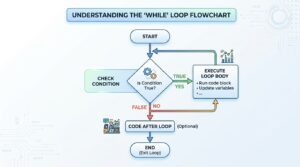
The Logic: How It Works
The flow of a while loop follows a specific cycle:
- Check Condition: The program evaluates the expression in the brackets,.
- True? If the condition is true, the program enters the Body and executes all statements,.
- Repeat: After the last statement in the body is finished, the program jumps back to the top to check the condition again,.
- False? If the condition is false, the loop “terminates,” and the program moves to the next line of code outside the loop,.
The Syntax: Writing Your First Loop
In C++, the while keyword must be in lowercase. Here is the general format:
while (condition) {
    // Body: Statements to repeat
}
Relatable Daily Life Example: The Security Guard
Think of a while loop like a security guard at a theater.
- The Condition: “Do you have a valid ticket?”
- The Pre-test: The guard checks your ticket before you enter the hall. If you don’t have one (False), you never get in.
- The Repetition: As long as there is a person with a ticket in line (True), the guard keeps performing the action of “checking and letting them in.”
Examples
Example 1: Basic Count-Controlled Loop
This program demonstrates a simple “count-controlled” loop. It prints numbers from a specific starting value to end value entered by the user. This shows the pre-test nature of the while loop, where the condition is checked before the body executes.
#include <iostream>
using namespace std;
int main() {
    // Initialization: Starting point of the loop
    int count = 0;
    int start = 0, final = 0;
    // The while keyword must be lowercase
    // Check if the condition is true before entering
    while (count <= final) {
        cout << "Current count is: " << start + count  << endl;
        // Update: Incrementing the variable is crucial to avoid an infinite loop
        count++;
    }
    return 0;
}
Example 2: User-Controlled Marks Calculator
This implementation is based on the primary example in the sources where the loop repeats until the user chooses to stop. It is used when you are unsure how many times the statements need to run at the start.
#include <iostream>
using namespace std;
int main() {
    // Initialize with 'y' to ensure the pre-test condition is true the first time
    char keepGoing = 'y';
    int english, programming, total;
    while (keepGoing == 'y') {
        cout << "Enter English marks: ";
        cin >> english;
        cout << "Enter Programming marks: ";
        cin >> programming;
        // Calculate and display the sum
        total = english + programming;
        cout << "Total Marks for this student: " << total << endl;
        // Update: Ask the user if they want to repeat
        cout << "Do you want to calculate for another student? (y/n): ";
        cin >> keepGoing;
    }
    // Termination: Runs once the user enters something other than 'y'
    cout << "Exiting program..." << endl;
    return 0;
}
Example 3: Robust Calculation with Logical Operators
This final example incorporates the logical OR (||) operator to make the loop more user-friendly. It handles both lowercase ‘y’ and uppercase ‘Y’, ensuring the loop doesn’t accidentally terminate just because of case sensitivity.
#include <iostream>
using namespace std;
int main() {
    char choice = 'Y';
    int math, science, sum;
    // Condition uses logical OR to check for both 'y' and 'Y'
    while (choice == 'y' || choice == 'Y') {
        cout << "--- New Entry ---" << endl;
        cout << "Enter Math marks: ";
        cin >> math;
        cout << "Enter Science marks: ";
        cin >> science;
        sum = math + science;
        cout << "Combined Marks: " << sum << endl;
        // User input determines if the loop cycles again
        cout << "Press 'Y' to continue or any other key to stop: ";
        cin >> choice;
    }
    // This executes only after the while condition becomes false
    cout << "Final calculations complete. Goodbye!" << endl;
    return 0;
}
Common Pitfalls
- The Infinite Loop: If your condition is always true (e.g., you never update the variable), the loop will run forever,.
- Case Sensitivity: Remember that ‘y’ is not the same as ‘Y’ in C++. Use logical operators to handle both.
- Semicolon Error: Never put a semicolon directly after while(condition);. This tells C++ the loop body is empty, often leading to an infinite loop that does nothing!
Interactive Elements: Try It Yourself!
- Reflection Prompt: Why is it important to initialize keepGoing to ‘y’ before the loop starts? What would happen if it was initialized to ‘n’?.
- Challenge 1: Write a loop that asks the user to enter a number and stops only when the user enters 0.
- Challenge 2: Modify the code above to also calculate the average of the two subjects inside the loop.
- Challenge 3: Write a program that gets the starting and ending limits from the user and prints the numbers between them followed by their squares. i.e.
Input:
1 3
Output:
number square
1 1
2 4
3 9 - The Infinite Loop Test: What happens if you remove the cin >> keepGoing; line from inside the loop? Try to predict the behavior.
- Logical Exercise: Try using the != (not equal) operator to create a loop that runs as long as the user does not type ‘q’ for quit.
Ready to Master C++?
For official technical deep-dives, check out the C++ Reference on While Statements.
Happy Coding!